
Donations · Step 5 of 6
Produce and issue the receipt for a gift without leaving the donation record.
You do not have to go to the Receipts view to receipt a single gift. Every donation carries its own receipt panel.
Open any saved donation. Part way down the form:
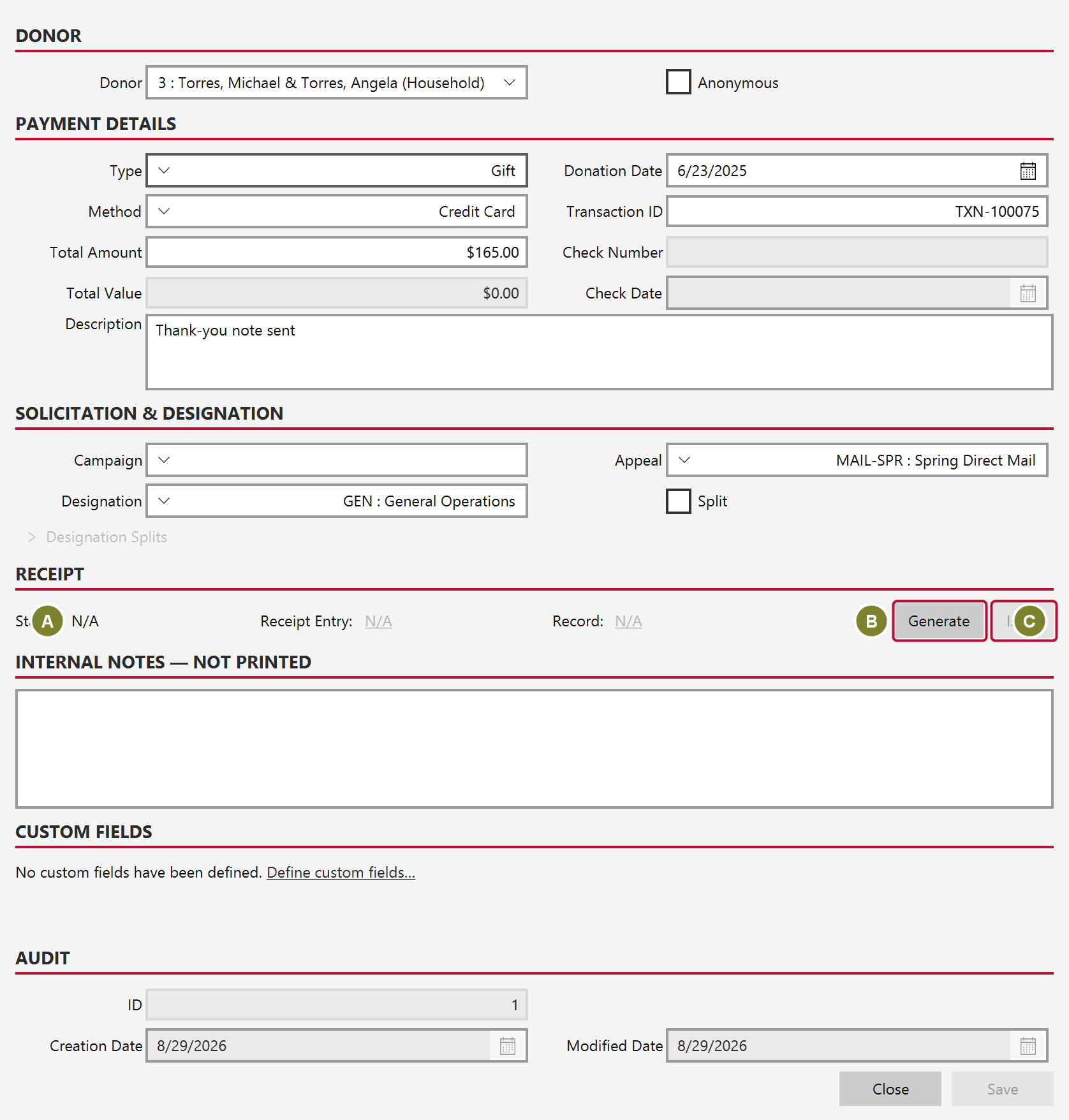
| Control | What it does |
|---|---|
| Status (A) | Where this gift stands: no receipt, draft, issued or voided |
| Generate (B) | Builds the receipt document from your template |
| Issue (C) | Marks it issued and assigns its sequential number |
Record and Receipt Entry become links once a document exists, so you can open the generated file straight from the record.
The two steps are separate on purpose. Generating produces a draft you can look at. Issuing is the commitment: it assigns the number that makes the receipt the donor's official record, and from that point a mistake is corrected by voiding and replacing rather than editing.
For a batch, the Receipts view has a queue of everything without a document yet. See Generate receipts from the queue.