
Receipts and documents · Step 1 of 6
Use the Record Not Generated queue to see every gift still without a document.
The Receipts view is arranged as four tabs.

The first three list documents that exist. The fourth is the one to start from.
Record Not Generated lists every donation, pledge and pledge payment that has no document yet.
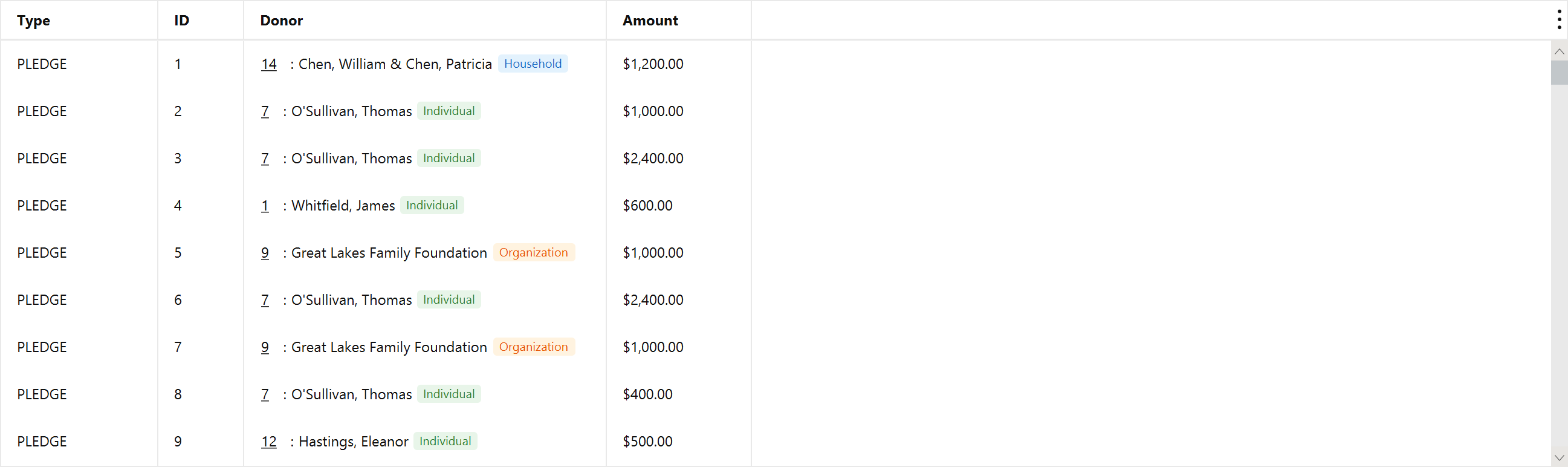
It is a to-do list rather than a report: as documents are generated, rows leave it. An empty queue means every record has a document — note that this is not the same as every document having been issued. A receipt generated and then left in draft leaves this queue immediately, and the dashboard card described below is where those show up.
The Type column matters because the queue is mixed. A donation needs a receipt; a pledge needs an acknowledgment; a pledge payment needs its own receipt. Mich picks the right template per row, so a mixed selection is fine.
The home dashboard carries the same backlog as two cards, so it is visible without going looking. Both list donations, pledges and pledge payments together and lead with the same Type badge used here, so a mixed selection reads the same on either screen.
Receipts Not Recorded is this queue. Same records, same rule.
Receipts Not Issued is the half this queue cannot show: receipts that were generated and then left in draft. A record leaves Not Recorded the moment a document exists for it, whatever state that document is in — so a draft sits in neither the tab above nor that first card, and the work looks finished on both while the donor has been sent nothing. The card lists every draft with its receipt number, so you can find it here and issue it.
Between them the two cards cover every state a receipt can be in: not recorded, recorded but not issued, or done.
Both cards belong to Donations and Pledges, so either domain shows them, and they disappear only when neither is on. Turn either card off on its own from the three-dot menu on the Tables section header.