
Reports · Step 4 of 4
Compare giving period by period, narrowed by campaign, appeal or gift type.
Period totals, for comparing this year against last.
Go to Reports, then Monthly / Yearly Totals.

Set the From (A) date. Span more than a year and you can compare like with like. The three dropdowns narrow what is counted:
Leave any of them blank to include everything.
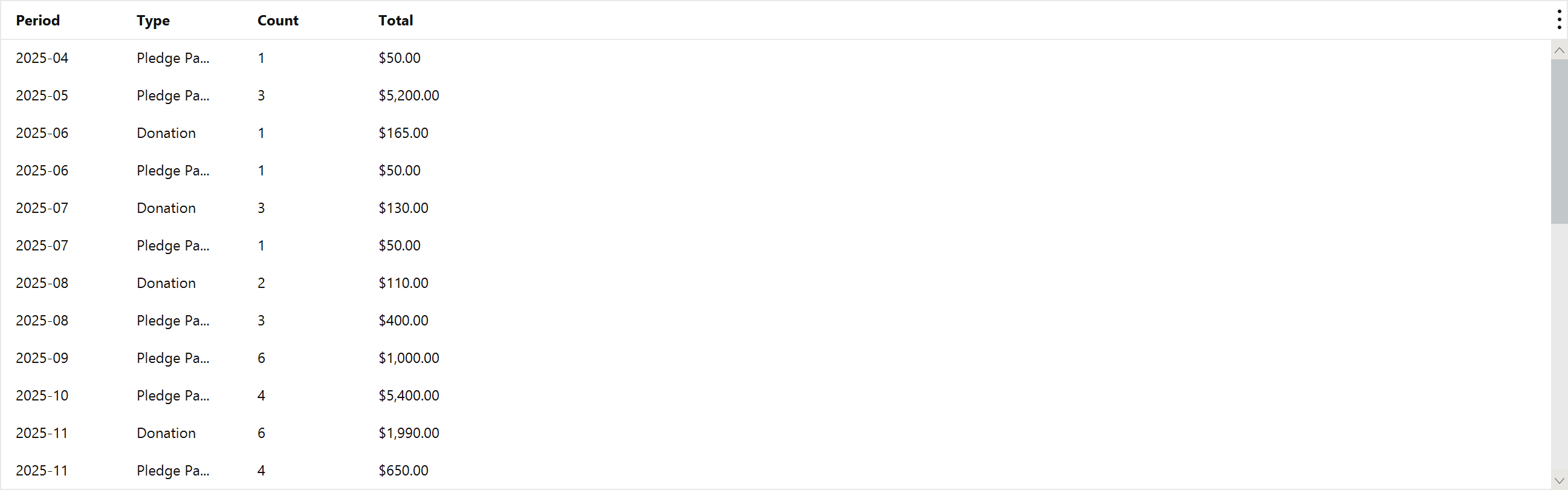
Restricting by Type is worth understanding. Donations, pledges and pledge payments are different kinds of number: a pledge is money promised, a pledge payment is money received against it. Adding them together would count the same commitment twice, which is exactly why they are separable here.